
更多>>关于我们
 西安鲲之鹏网络信息技术有限公司从2010年开始专注于Web(网站)数据抓取领域。致力于为广大中国客户提供准确、快捷的数据采集相关服务。我们采用分布式系统架构,日采集网页数千万。我们拥有海量稳定高匿HTTP代理IP地址池,可以有效获取互联网任何公开可见信息。
 您只需告诉我们您想抓取的网站是什么,您感兴趣的字段有哪些,你需要的数据是哪种格式,我们将为您做所有的工作,最后把数据(或程序)交付给你。
 数据的格式可以是CSV、JSON、XML、ACCESS、SQLITE、MSSQL、MYSQL等等。
更多>>技术文章
更多>>官方微博
-
【经验分享】未解锁BL的手机进9008模式(Mi6X为例)
对于未解锁BL的手机,需要拆机,通过短接特定触点的方式进入9008模式。
以小米Mi6X为例:
第一步,拧掉充电口旁边的两颗螺丝。
第二步,扣开后盖,可能不太好扣,可以借助美工刀在边缘撬一下。拧掉保护条上的3个螺丝。
第三步,拔掉电池排线。看图,记着两个短接触点的位置。
第四步,用镊子短接两个触点,同时插入TypeC线,2秒左右设备管理器"端口COM"里会出现9008接口,此时松开镊子。发布时间:2024-11-27 10:13:20
-
【经验分享】已解锁BL的手机进9008模式
高通9008模式全称"Qualcomm HS-USB QDLoader 9008",它相对于recovery、fastboot和Android系统是独立的。即深刷模式,也叫EDL,号称"救砖神奇"。
对于已解锁BL的手机,进入9008相对比较简单,以小米Mi6X为例:
1. 先确定手机是否解锁BL了。已解锁BL的手机,刚开机的时候会有"Unlocked"字样,如附图1所示。
2. 长按“音量减键 + 开机键”进入fastboot。
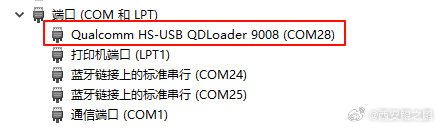
3. 执行fastboot oem edl,即可进入9008模式,进入成功后设备管理器COM端口里可以看到"Qualcomm HS-USB QDLoader 9008"。如附图2、3所示。发布时间:2024-11-26 12:53:03
-
【经验分享】com.android.org.conscrypt.TrustManagerImpl证书固定检测绕过示例
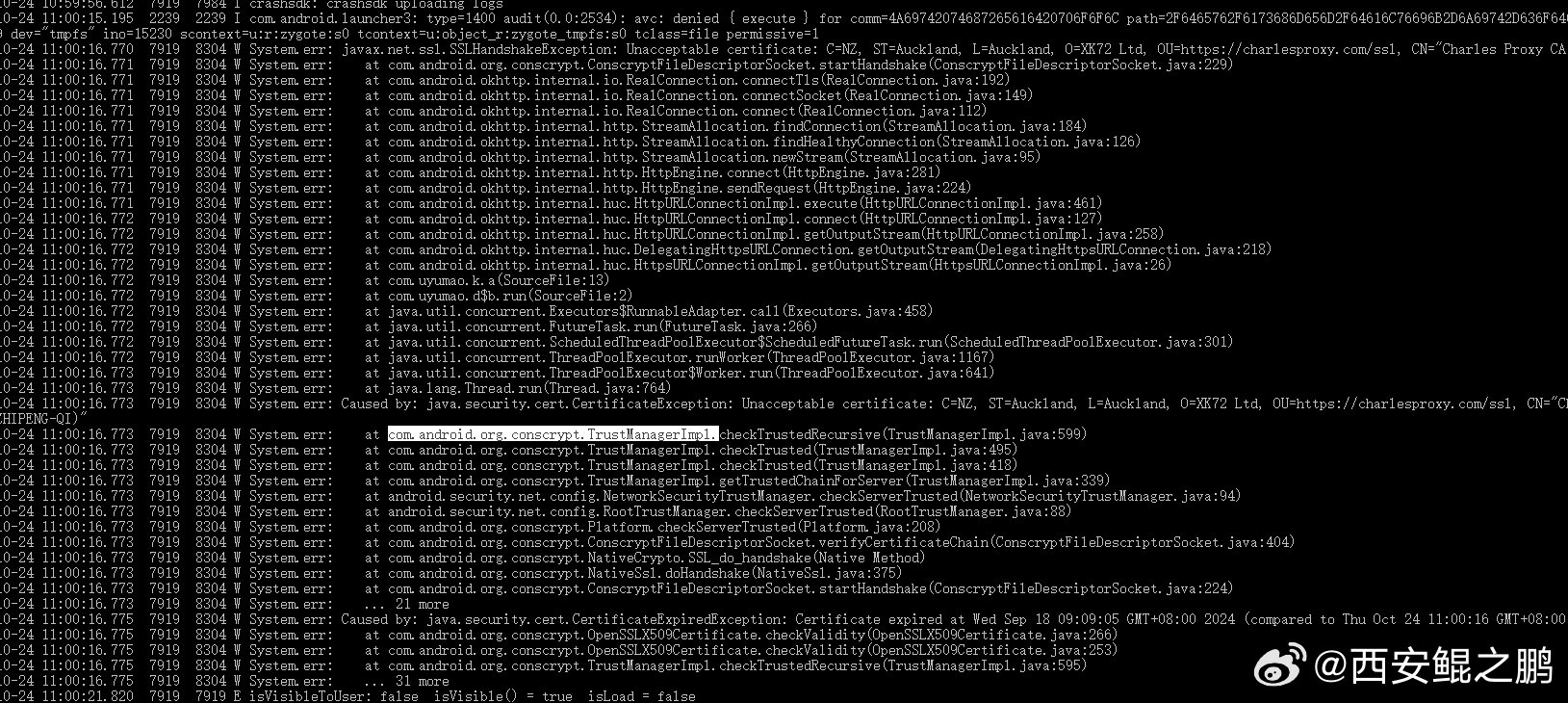
某APP使用通用的sslunpinning脚本后仍然抓不到包:
(1)分析logcat日志,发现com.android.org.conscrypt.TrustManagerImpl类相关代码抛出java.security.cert.CertificateException异常,如图1所示。
(2)hook 类com.android.org.conscrypt.TrustManagerImpl的checkTrusted和checkServerTrusted方法,返回空列表,成功抓到包。
日志线索寻找关键词:CertificateException、CertificateExpiredExceptio、SSLHandshakeException发布时间:2024-10-24 15:36:45
-
【经验分享】如何获取安卓手机上已安装APP的安装包(.apk)文件?
1. 先查看已安装APP列表,确定对应APP的包名。
adb shell pm list packages
2. 假设包名为org.gushiwen.gushiwen。再根据包名查看APP的详细信息:
adb shell dumpsys package org.gushiwen.gushiwen
返回信息中的path属性,以base.apk结尾的,即就是这个APP的安装文件,如附图1所示。另外返回的信息中还有当前APP的版本(versionName属性),如附图2所示。
3. pull下来这个文件,就可以在其它设备上安装了。发布时间:2024-10-22 11:27:51
-
【经验分享】Dell R720意外断电重启之后丢失硬盘(硬盘状态变为Foreign)问题解决?
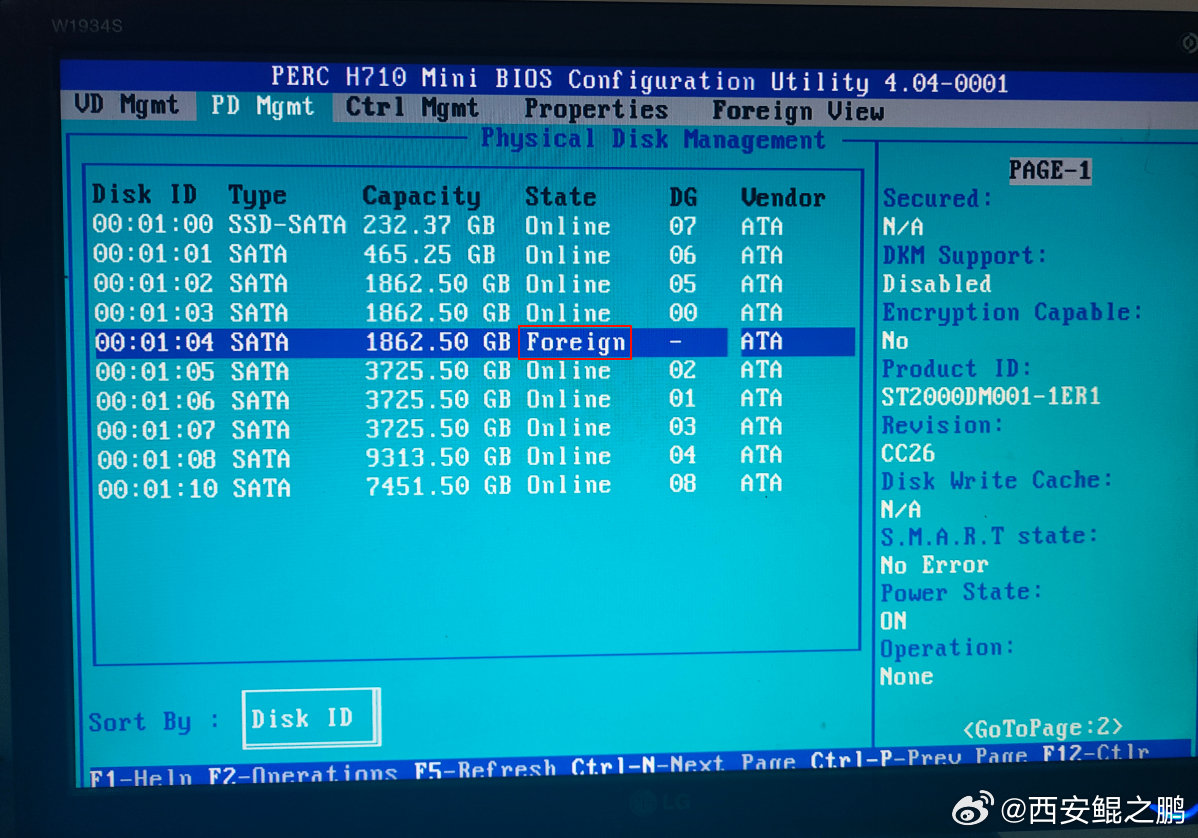
本来有10块盘,启动的时候显示只有9块Virtual Disk。“Ctrl + R”进入RAID设置,在“VD Mgmt”标签页下也只看到了9块Virtual Disk。在“PD Mgmt”标签页下看到是有10块物理盘,不过第5块状态变成“Foreign”了(如附图1所示)。
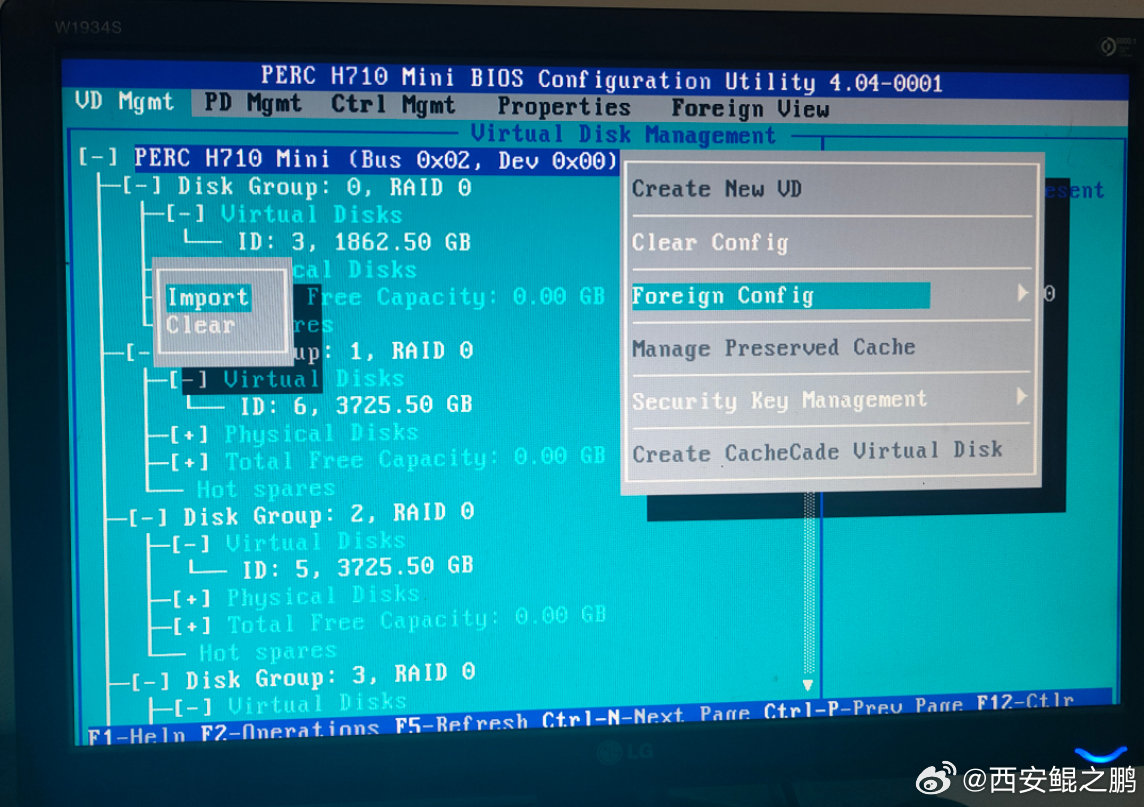
解决方法:在“VD Mgmt”标签页下,焦点切换到"PERC H710 Mini"上按F2,然后"Foreign Config",再然后"Import",操作完成(要等待几秒)之后就能看到全部盘了,如图2所示。
PS:用Ctrl + N快捷键切换菜单标签。发布时间:2024-10-18 16:35:44
-
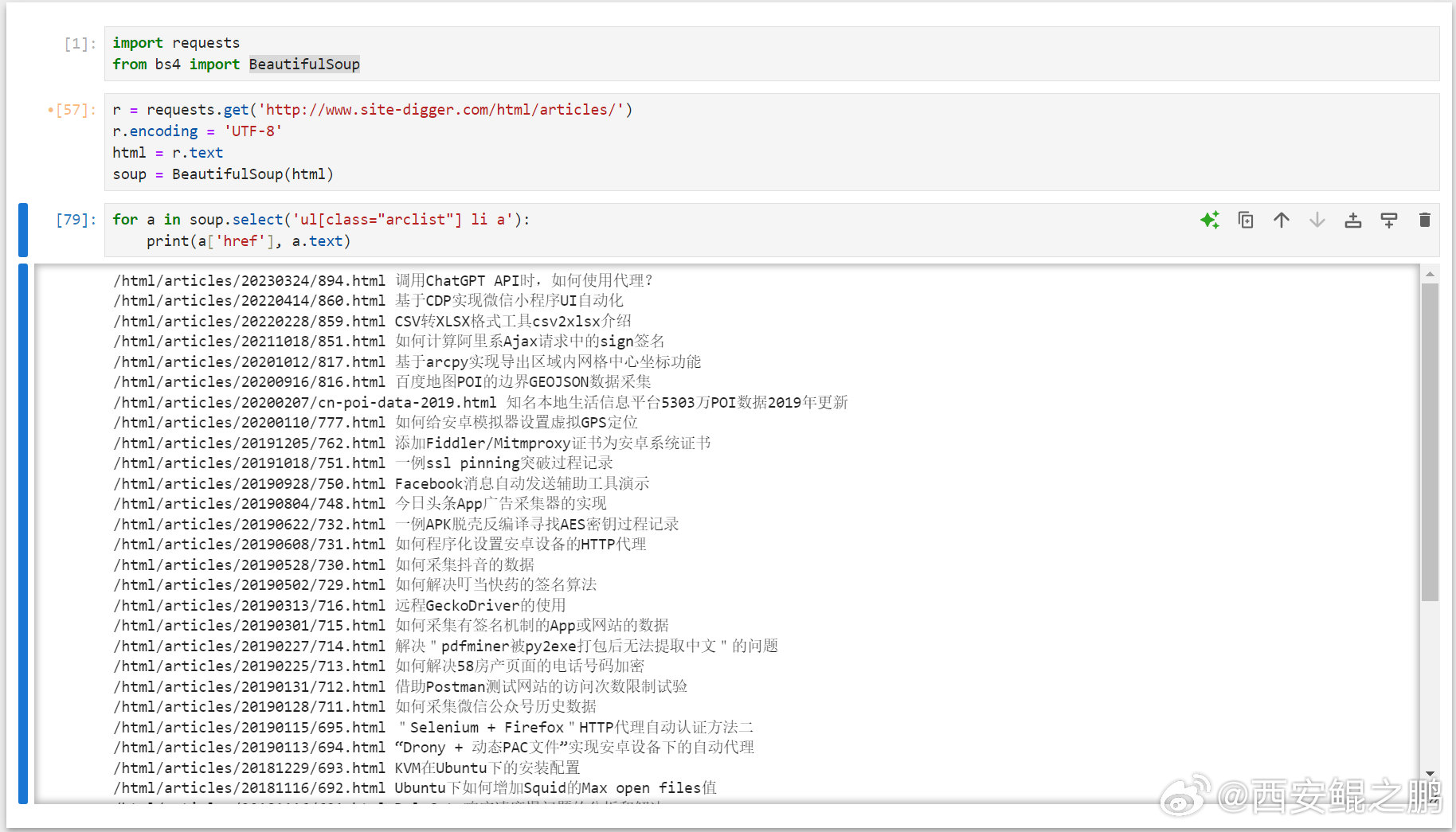
【经验分享】一个游戏闯关模式学习CSS Selector的网站"CSS Diner":https://flukeout.github.io/。
Python使用BeautifulSoup实现CSS Selector解析HTML文档的示例:
import requests
from bs4 import BeautifulSoup
r = requests.get('http://www.site-digger.com/html/articles/')
r.encoding = 'UTF-8'
html = r.text
soup = BeautifulSoup(html)
for a in soup.select('ul[class="arclist"] li a'):
print(a['href'], a.text)发布时间:2024-09-02 19:43:03
-
【经验分享】qemu-system-x86运行tiny11
(1) 安装qemu-system-x86,安装完成后无需重启。
sudo apt-get update
sudo apt-get install qemu qemu-utils qemu-system-x86
(2) 创建硬盘。
qemu-img create -f qcow2 tiny11.img 50G
(3) 创建虚拟机。
sudo qemu-system-x86_64 --enable-kvm -m 2G -smp 4 -boot order=dc -hda /home/qi/kvm/tiny11-1/tiny11.img -cdrom /home/qi/kvm/tiny11_23H2_x64.iso -vnc :1
(4) vnc连接 "服务器ip:5901",完成系统安装过程。设置vnc密码的方法:https://qemu-project.gitlab.io/qemu/system/vnc-security.html#with-passwords。
(5) 映射主机端口给虚拟机,使用-redir参数。如下示例,将主机的TCP/UDP4001端口映射到虚拟机的4000端口。
-redir tcp:4001::4000 -redir udp:4001::4000发布时间:2024-08-10 12:13:46
-
【经验分享】Playwright过geo.captcha-delivery.com检测
page.add_init_script('''Object.defineProperties(navigator, {webdriver:{get:()=>undefined}}); delete navigator.__proto__.webdriver;''') 发布时间:2024-07-31 10:41:18
-
【经验分享】scrcpy在网络质量欠佳环境下可以通过降低码率来提高流畅度
e.g.
scrcpy --bit-rate 1M --max-fps 5
注意:在新版本中--bit-rate参数更名为--video-bit-rate 发布时间:2024-07-03 10:11:54
-
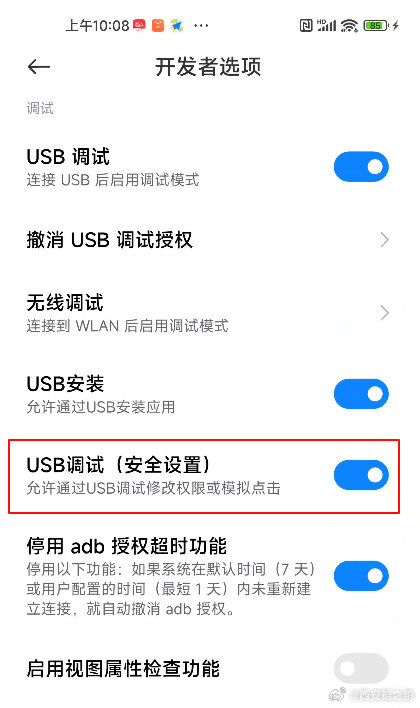
【经验分享】scrcpy在小米手机上鼠标不起作用问题的解决
在“开发者选项”中需要打开"USB调试(安全设置) - 允许通过USB调试修改权限或模拟点击"。要打开这个选项,手机需要先登录小米账号,另外手机必须要插有SIM卡。 发布时间:2024-07-03 10:09:29









近日我在查询Squid相关问题时无意在谷歌搜索结果中看到external_acl_type,然后详细了解了一下,发现它功能是在太强大了。
利用external_acl_type可以自定义一种Squid的ACL类型,并且可以指定一个自定义的后端程序(Helper Program)。我们可以向这个后端程序动态传递很多有用的参数,例如客户端IP (%SRC,) 服务端IP( %MYADDR),客户端访问的URL( %PATH),访问者的用户名( %LOGIN)等变量,然后在认证程序中我们可以根据这些变量实现复杂的逻辑认证。PS:我在网上找了很久都没找到介绍这些变量参数含义的,最后抱着试一试的想法在squid.conf的注释中找到的详细的说明(如下FORMAT specifications部分)。
#  TAG: external_acl_type
#       This option defines external acl classes using a helper program
#       to look up the status
#
#         external_acl_type name [options] FORMAT.. /path/to/helper [helper arguments..]
#
#       Options:
#
#         ttl=n         TTL in seconds for cached results (defaults to 3600
#                       for 1 hour)
#         negative_ttl=n
#                       TTL for cached negative lookups (default same
#                       as ttl)
#         children-max=n
#                       Maximum number of acl helper processes spawned to service
#                       external acl lookups of this type. (default 20)
#         children-startup=n
#                       Minimum number of acl helper processes to spawn during
#                       startup and reconfigure to service external acl lookups
#                       of this type. (default 0)
#         children-idle=n
#                       Number of acl helper processes to keep ahead of traffic
#                       loads. Squid will spawn this many at once whenever load
#                       rises above the capabilities of existing processes.
#                       Up to the value of children-max. (default 1)
#         concurrency=n concurrency level per process. Only used with helpers
#                       capable of processing more than one query at a time.
#         cache=n       limit the result cache size, default is unbounded.
#         grace=n       Percentage remaining of TTL where a refresh of a
#                       cached entry should be initiated without needing to
#                       wait for a new reply. (default is for no grace period)
#         protocol=2.5  Compatibility mode for Squid-2.5 external acl helpers
#         ipv4 / ipv6   IP protocol used to communicate with this helper.
#                       The default is to auto-detect IPv6 and use it when available.
#
#       FORMAT specifications
#
#         %LOGIN        Authenticated user login name
#         %EXT_USER     Username from previous external acl
#         %EXT_LOG      Log details from previous external acl
#         %EXT_TAG      Tag from previous external acl
#         %IDENT        Ident user name
#         %SRC          Client IP
#         %SRCPORT      Client source port
#         %URI          Requested URI
#         %DST          Requested host
#         %PROTO        Requested protocol
#         %PORT         Requested port
#         %PATH         Requested URL path
#         %METHOD       Request method
#         %MYADDR       Squid interface address
#         %MYPORT       Squid http_port number
#         %PATH         Requested URL-path (including query-string if any)
#         %USER_CERT    SSL User certificate in PEM format
#         %USER_CERTCHAIN SSL User certificate chain in PEM format
#         %USER_CERT_xx SSL User certificate subject attribute xx
#         %USER_CA_xx   SSL User certificate issuer attribute xx
#
#         %>{Header}    HTTP request header "Header"
#         %>{Hdr:member}
#                       HTTP request header "Hdr" list member "member"
#         %>{Hdr:;member}
#                       HTTP request header list member using ; as
#                       list separator. ; can be any non-alphanumeric
#                       character.
#
#         %<{Header}    HTTP reply header "Header"
#         %<{Hdr:member}
#                       HTTP reply header "Hdr" list member "member"
#         %<{Hdr:;member}
#                       HTTP reply header list member using ; as
#                       list separator. ; can be any non-alphanumeric
#                       character.
#
#         %ACL          The name of the ACL being tested.
#         %DATA         The ACL arguments. If not used then any arguments
#                       is automatically added at the end of the line
#                       sent to the helper.
#                       NOTE: this will encode the arguments as one token,
#                       whereas the default will pass each separately.
#
#         %%            The percent sign. Useful for helpers which need
#                       an unchanging input format.
#
#       In addition to the above, any string specified in the referencing
#       acl will also be included in the helper request line, after the
#       specified formats (see the "acl external" directive)
#
#       The helper receives lines per the above format specification,
#       and returns lines starting with OK or ERR indicating the validity
#       of the request and optionally followed by additional keywords with
#       more details.
#
#       General result syntax:
#
#         OK/ERR keyword=value ...
#
#       Defined keywords:
#
#         user=         The users name (login)
#         password=     The users password (for login= cache_peer option)
#         message=      Message describing the reason. Available as %o
#                       in error pages
#         tag=          Apply a tag to a request (for both ERR and OK results)
#                       Only sets a tag, does not alter existing tags.
#         log=          String to be logged in access.log. Available as
#                       %ea in logformat specifications
#
#       If protocol=3.0 (the default) then URL escaping is used to protect
#       each value in both requests and responses.
#
#       If using protocol=2.5 then all values need to be enclosed in quotes
#       if they may contain whitespace, or the whitespace escaped using \.
#       And quotes or \ characters within the keyword value must be \ escaped.
#
#       When using the concurrency= option the protocol is changed by
#       introducing a query channel tag infront of the request/response.
#       The query channel tag is a number between 0 and concurrency-1.
#Default:
# none
配置示例:
下面这个配置结合了“用户名密码认证(HTTP Basic Auth)”和“自定义的认证”。只有同时通过这两个认证的请求才会被Squid放行(否则会返回403)。
external_acl_type自定义认证部分后端程序使用自己编写的Python脚本(后面有源码),并将%LOGIN(客户用户名),%SRC(客户端IP) ,%MYADDR(服务端IP)作为命令行参数传递给后端认证程序。
#用户名密码认证:
auth_param basic program /usr/lib/squid/ncsa_auth /etc/squid/users.pwd
auth_param basic children 5
auth_param basic realm IPRENT.CN Proxy Auth Required
auth_param basic credentialsttl 2 hours
#使用external_acl_type实现的自定义认证,后台程序 /etc/squid/squid_external_acl_helper.py
#支持多种宏格式,上面帮助文档里面有列举。
#ipv4标记如果不加,可能会看到“external ACL 'ip_user_check' queue overload”异常(cache.log), >>> https://ubuntuforums.org/showthread.php?t=2187256
external_acl_type ip_user_check children-startup=5 ipv4 %LOGIN %SRC %MYADDR /usr/bin/python /etc/squid/squid_external_acl_helper.py

acl ipuseracl external ip_user_check
acl auth_users proxy_auth REQUIRED
http_access allow auth_users ipuseracl
后台程序(Helper program)示例脚本(Python):
这里只写了一个框架(直接返回验证通过),没有加入实际性的逻辑判断,你可以根据传递进来的参数实现复杂的逻辑判断。
# coding: utf-8
# squid_external_acl_helper.py
# Author: redice(qi@site-digger.com)
# Created at: 2016-10-14

# Python版本的Squid external_acl_type扩展ACL后台脚本
# 在squid.conf中的"htcp_access deny all"之前加入如下配置:
#external_acl_type ip_user_check children-startup=5 ipv4 %LOGIN %SRC %MYADDR /usr/bin/python /etc/squid/squid_external_acl_helper.py
#acl ipuseracl external ip_user_check
#http_access allow ipuseracl


import sys
import logging

# 记录日志
# sudo chmod 755 /var/log/squid/squid_auth_helper.log
# sudo chown proxy:proxy /var/log/squid/squid_auth_helper.log
logging.basicConfig(level=logging.DEBUG,
                    format='%(asctime)s %(levelname)s %(message)s',
                    filename='/var/log/squid/squid_auth_helper.log', filemode='a')


if __name__ == '__main__':
    while True:
        # 从stdin读取一行
        line = sys.stdin.readline()
        username, client_ip, local_ip = line.split()
        logging.info('New auth request: username = {}, client_ip = {}, local_ip = {}'.format(username, client_ip, local_ip))
        # 这里直接输出'OK'(通过认证,反之输出'ERR\n')。你可以根据上述参数实现复杂的认证逻辑。
        sys.stdout.write('OK\n')
        sys.stdout.flush()
日志输出示例:
2016-10-14 12:29:11,968 INFO New auth request: username = test, client_ip = 103.27.125.250, local_ip = 58.96.184.54